Even if you don’t manage your company’s advertising and business accounts yourself — whether it’s handled internally by your team or outsourced to an agency — you’ve probably heard stories about Meta ad accounts suddenly being “locked,” making it impossible to run ads.
Below, based on Conversion Ninja’s experience, we’ll cover how to avoid this situation, the main reasons Meta ad accounts get restricted, and what to do if it happens to you.
What Does It Mean When a Meta Ad Account Is Restricted?
When a Meta account is restricted, you can still manage your pages and post content, but you lose the ability to create ads and manage ad or Meta Business accounts. If Meta ads play an important role in your sales and marketing strategy, this is a serious issue.
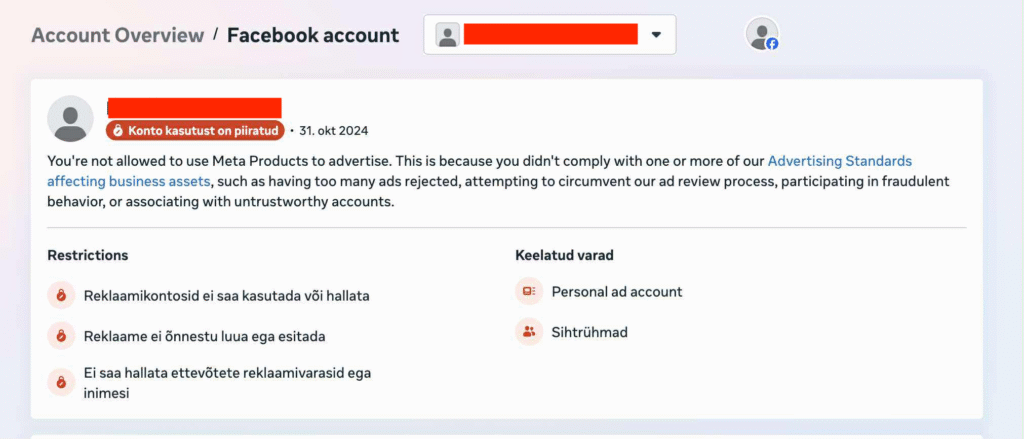
Why Meta Ad Accounts Get Restricted or Blocked
Ad restrictions are a necessary and logical part of Meta’s terms of use. Ads are not allowed to include, for example:
- misinformation;
- prohibited products and services;
- discriminatory content;
- shocking visuals or text;
- advertising adult products to children.
In addition, Meta uses automated filters to detect inappropriate words and phrases. The exact list of prohibited terms is not public, and these terms evolve over time. Ads containing prohibited content are rejected, and repeated violations can lead to account restrictions.
Your account can also end up in Meta “jail” if, for example, a related account has an expired credit card or insufficient funds to pay ad invoices. Ad account blocks can also occur through random technical malfunction.
Once restrictions are in place, it’s almost impossible to figure out exactly why the ad account was blocked, because you may also lose access to Business Manager, which is used to manage associated accounts and permissions.
How Meta Detects Policy Violations
Violations are detected primarily through automated systems. Manual reviews by humans are minimal due to the huge volume of ads. Meta doesn’t disclose its exact processes, but manual checks mainly happen when you file an appeal.
During Meta’s “Year of Efficiency” in 2023–2024, the company laid off more than 20,000 employees, which reduced customer support and manual review capacity. As a result, your account may be restricted even if you didn’t knowingly break any rules.
How to Avoid Meta Ad Account Restrictions
- Make Sure Your Ad Content Is Compliant
Do everything you can to ensure your ads follow Meta’s advertising policies. Because the list of prohibited words and phrases is dynamic and context-sensitive, be extra cautious with translations and wording that could be misinterpreted as a violation.
Meta may also flag excessive use of superlatives (e.g., “best,” “guaranteed results”), or overly personal statements (e.g., “Do your knees hurt?”). - Add Multiple Administrators to Each Ad Account
If your personal profile gets restricted, you may lose the ability to manage ads. But if there are other admins on the account, your company can keep running ads. Restrictions usually apply to the user, not the account itself. - Remove Yourself From “Dead” Accounts
If your business account is connected to ad accounts you no longer use, remove yourself. This is especially important for agencies managing many clients. Just one non-compliant account can affect your own standing. - Diversify Your Marketing Channels
Don’t rely on a single platform for advertising. Spreading your marketing efforts across multiple channels reduces risk and allows you to keep running campaigns if one platform suddenly locks you out.
What to Do If Your Meta Ad Account Is Restricted
If your account gets restricted, you can submit an appeal within 30 days of receiving the notice.
The appeals process can be tedious, and it’s often a good idea to get help from someone experienced with Meta policies.
Once the 30-day window passes, there’s no way to contact Meta to resolve the issue. Even if “Mark himself” wanted to, these accounts can’t be unlocked. You’ll kindly suggestud to wait for policy changes.
Creating a new account under the same person or legal entity is not allowed and leads to the new account being blocked quickly as well.
Summary
If your ad accounts aren’t restricted – make sure as soon as possible that there are multiple admins on each account, your payment cards are valid and active, and there are no unnecessary accounts connected to you.
If your ad accounts are restricted and 30 days have passed — gg, welcome to the fam 😄